Convert any GitHub blob URL into a raw direct download link with our GitHub tool. Perfect for docs, assets, classrooms, and scripts that need clean one-click access.
What is a GitHub raw link?
A raw link serves the file exactly as stored in the repository without the GitHub UI wrapper. Instead of showing the code viewer, the browser downloads or renders the file directly. This is ideal for images, JSON configs, CSV data, and markdown that you want to consume from apps, sites, or CLIs.
Fast path: DriveDirect Gen
- Open the file on GitHub and copy the blob URL (it contains /blob/).
- Paste it into DriveDirect Gen and click Generate.
- We swap github.com to raw.githubusercontent.com and drop the /blob/ segment.
- Copy the raw link or grab a QR for easy phone access.
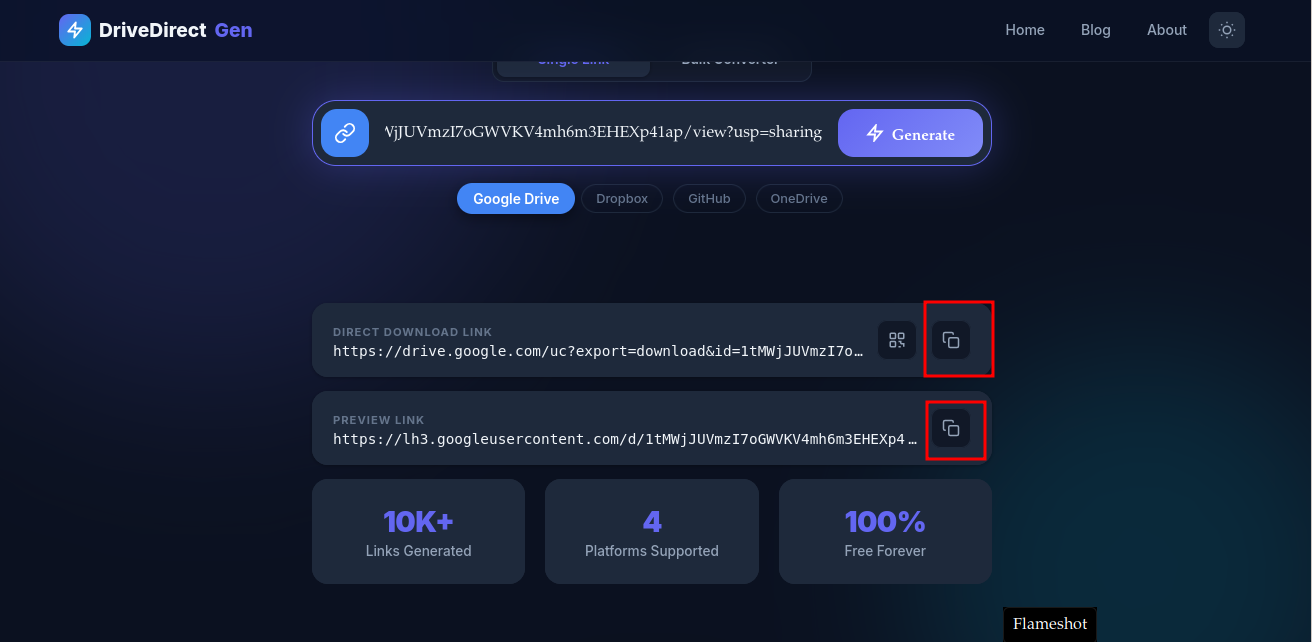
Paste - Generate - Raw link ready to share.
Manual pattern (in case you're curious)
Take the blob URL:
https://github.com/user/repo/blob/main/path/to/file.png
Swap the domain and remove /blob:
https://raw.githubusercontent.com/user/repo/main/path/to/file.png
That's the raw direct link. Our generator does this instantly and avoids typos.
Use cases
- Docs and wikis: Reference images or JSON from a CDN-like raw URL.
- Classroom handouts: Share code files without forcing students to click “Download”.
- APIs and scripts: Fetch configs with
curlorwgetdirectly. - Static sites: Embed markdown or data files during build steps.
CLI examples
Download with curl:
curl -L "YOUR_RAW_LINK" -o file.ext
Download with wget:
wget --content-disposition "YOUR_RAW_LINK"
The -L flag follows redirects, which GitHub uses for some files.
Working with private repos
Raw links from private repositories require authentication headers. For safety, avoid exposing private raw URLs publicly. If you must automate downloads, use a GitHub token in your request headers and keep it server-side.
Image hotlinking and caching
Raw GitHub links work for images in markdown and chat apps, but GitHub is not a CDN. For heavy traffic, cache the file elsewhere after pulling it once. For structured public downloads that need a simpler handoff, consider Google Drive.
Troubleshooting
- 404 after rename: Raw links break if you rename or move the file. Re-copy and reconvert.
- Wrong branch: Ensure the branch path in the URL (main, master, or feature branch) matches the file.
- Large binary files: Git LFS assets may require LFS endpoints. For normal binaries under 100 MB, raw works.
- Mixed content warnings: Always use https raw links when embedding on https sites.
When raw links are the wrong tool
Raw GitHub links are excellent for lightweight public files, but they are not the best answer for everything. If you expect high traffic, need strict access control, or are distributing large binaries repeatedly, a dedicated file host or object storage service will usually be more stable. In those cases, raw links are better treated as a convenience layer for docs, examples, and setup assets rather than your entire delivery system.
That distinction helps teams choose the right tool. Keep the small public repo files on GitHub, but move heavier customer-facing downloads to something like Google Drive or another purpose-built host when distribution scale grows.
Versioning habits that keep links stable
- Avoid renaming files casually after sharing them publicly.
- Prefer stable branches or release tags for files people reference often.
- Document the exact raw path in your README or release notes.
- If a file must move, update all public docs at the same time.
Teams run into fewer broken raw links when they treat file paths as part of the public interface, not as an internal detail. That mindset matters just as much as the conversion itself.
How teams usually publish raw downloads
A good pattern is to keep the source file in the repository, publish the raw link in docs, and mention the expected filename or purpose nearby. This works well for starter templates, sample configs, CSV seeds, and public markdown resources. The link becomes much easier to trust when readers know exactly what they are downloading.
If the same asset is shared widely outside developer circles, consider whether a friendlier tool page or mirror host would reduce friction for the audience.
In practice, raw links shine when the audience understands files and paths, and they become less ideal as the audience becomes broader and less technical.
Best practices
- Keep file paths stable; avoid renaming frequently.
- Add a short README section that lists raw links for teammates.
- Test the raw link in incognito and on mobile.
- When sharing in docs, label it clearly: “Direct download link”.
Ready to share? Paste any GitHub file URL into DriveDirect Gen and copy the raw direct link in one click.
Related guides
- Automate downloads with curl/wget using your raw URLs.
- Convert many links in bulk before sharing repo assets broadly.
- See generator vs manual conversion to choose the right workflow.
- Add QR codes to raw downloads for talks, meetups, or posters.