Learn how to transform any Dropbox share link into a one-click download URL, fix common blockers, and share it safely with students, clients, or teammates.
What is a Dropbox direct download link?
A Dropbox direct download link is a URL that skips the Dropbox preview page and starts the file download immediately. Instead of seeing the big blue “Download” button, your visitors get the file with one click. This is perfect for classroom handouts, client deliverables, app assets, and newsletters where you want zero friction.
Dropbox preview URLs look like https://www.dropbox.com/s/FILE_ID/filename. A direct link uses dl.dropboxusercontent.com and removes query strings so browsers treat it as a file to fetch, not a page to show.
Fastest way: Use our Dropbox generator
- Copy your Dropbox share link (make sure the file is shared to “Anyone with link”).
- Open DriveDirect Gen in your browser.
- Paste the link and click Generate. We swap the domain and strip extra params.
- Copy the new direct link. You can also hit the QR button to get a scannable code.
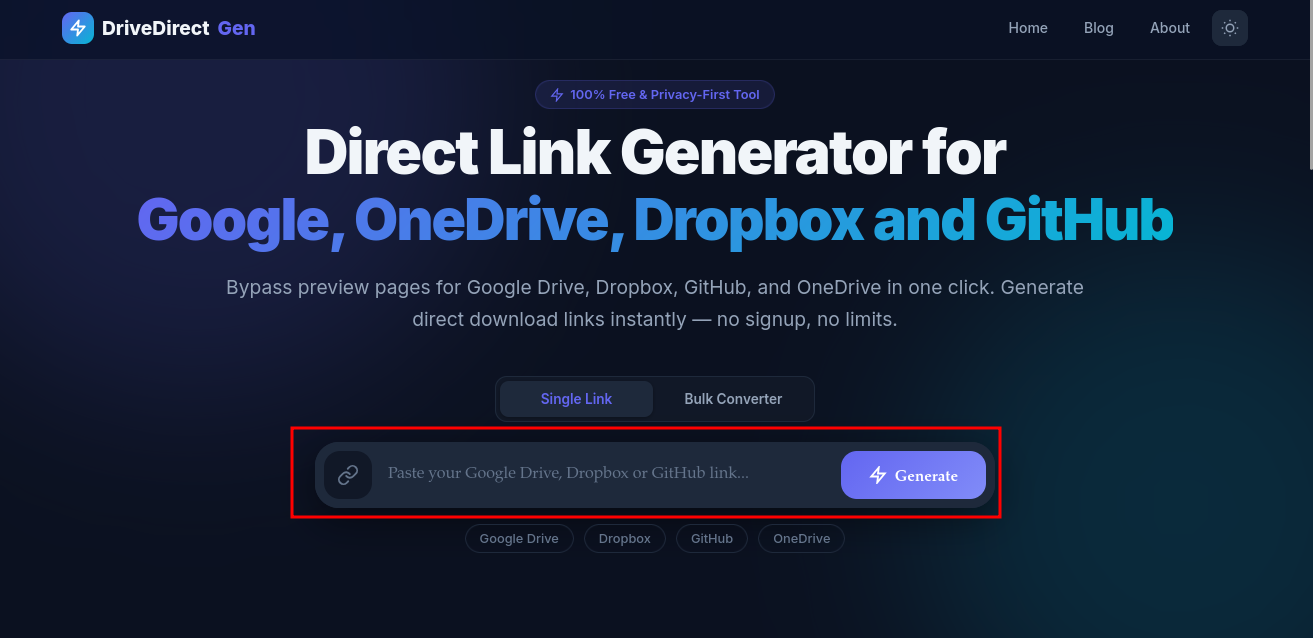
Paste, click Generate, copy the direct link - done in seconds.
Manual method (if you want to see the pattern)
Take the shared link:
https://www.dropbox.com/s/abc123/file.zip?dl=0
Change the domain to dl.dropboxusercontent.com and drop the query string:
https://dl.dropboxusercontent.com/s/abc123/file.zip
That's it. If you see dl=0 or raw=1, you can remove them - the direct domain is enough.
Common mistakes and quick fixes
- Private link: Set the file to “Anyone with link” before converting.
- Domain not changed: If it still shows preview, confirm the domain is dl.dropboxusercontent.com.
- Query clutter: Remove extra query params (?dl=0, ?raw=1) after the swap.
- Moved or renamed file: Changing filename breaks the old URL. Re-copy and convert the new link.
Share it smarter: embeds, buttons, and QR codes
Embed in a website button
Use the direct link inside a CTA button so visitors download instantly:
<a href="YOUR_DIRECT_LINK" download class="btn">Download now</a>
Send to phones with QR
After generating the link in DriveDirect Gen, hit the QR icon. Save the PNG and drop it in classroom slides or event posters. Students can scan and download right away.
Direct links for images and videos
Image direct links from Dropbox work inside <img> tags, markdown, and chat apps. For videos, smaller files stream in-browser, larger files download directly. If you need consistent streaming, consider converting to a smaller MP4 before sharing.
Security and bandwidth notes
Dropbox enforces traffic limits on public links. If too many people download a large file quickly, the link may get temporarily throttled. When that happens:
- Reduce file size (zip or compress video).
- Split the audience by time (share later again) or mirror the file in Google Drive or OneDrive.
- Rotate to an alternate link if it's time-sensitive.
Your privacy is still intact: our tool converts links in the browser. We never log or store your URLs.
Troubleshooting checklist
- Open the share dialog - set to “Anyone with link”.
- Copy the link fresh, convert it, and test in an incognito tab.
- If you see a 404, check that the file wasn't moved or renamed.
- If users report a preview page, make sure the domain is swapped correctly.
- For blocked downloads, wait for quota reset or share a lighter version.
Quick copy: best-practice template
- Keep filenames simple (no spaces if possible).
- Always test the link logged out or in incognito.
- Add a short note when you send it: “Click and it downloads immediately.”
- Pair with a QR code for offline or print workflows.
Ready to share? Paste your Dropbox link into DriveDirect Gen and grab the direct URL now.
When Dropbox is the better host
Dropbox is often the cleaner option when you are sending polished client files, asset packs, and simple one-click downloads that do not need a full workspace around them. Some teams prefer it over Google Drive because the sharing model feels lighter for outside recipients. Others use it as the backup mirror when Drive traffic spikes or a Microsoft-centered team wants something more public-facing than OneDrive.
The key is not that Dropbox is always better. It is that the direct-link experience can feel very clean when your goal is simply: receive the file, save it, and move on.
How to present the link to recipients
- Tell people what the file is before the button or link.
- Add file type and size when mobile users are common.
- Use a mirror label when you provide a second host.
- Turn the final direct link into a button or QR code if the audience is less technical.
A good direct link does not just download correctly. It also looks trustworthy in the message, landing page, or handout where people first see it.
Related guides
- Create OneDrive direct links as an additional mirror for big audiences.
- Build Google Drive direct links when you need a Drive alternative.
- Generate QR codes for downloads to share Dropbox files at events or in class.
- Automate downloads with curl/wget once your Dropbox links are converted.